CapCut SRT Generator
Use our CapCut SRT generator to create 1–3 word vertical subtitles without a CapCut Pro subscription—import the .SRT into CapCut Desktop or burn 9:16 Word Pop MP4s right here.
Drag & drop your video or audio
MP3, WAV, M4A, MP4, MOV, WebM, MKV · Up to 1 GB · Free up to 5 min, no sign-up
More ▾
How Our CapCut SRT Generator Bypassed Auto-Caption Paywalls
Upload your 9:16 vertical clip (auto-detected)
Drop any vertical MP4 or MOV from iPhone, TikTok, or CapCut. Our studio detects 9:16 aspect ratio automatically and sets 1–3 word TikTok pacing + Safe 16% vertical placement.
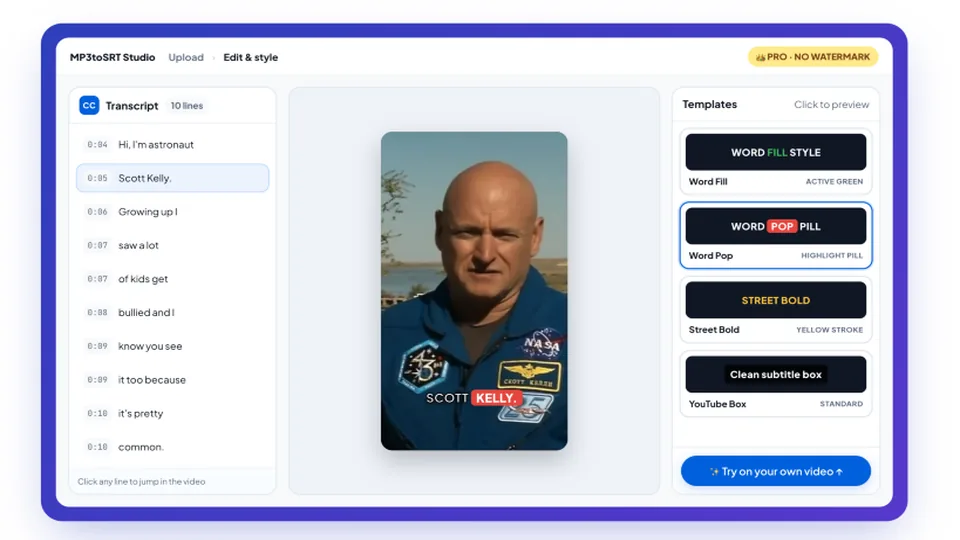
Pick Word Fill, Word Pop, or Spotlight styles
Preview live active-word neon green Word Fill, red Word Pop pills, Spotlight glow, or Street Bold yellow stroke over your vertical frame with zero black bars.
Import .SRT into CapCut or export burned 9:16 MP4
Download the free .SRT file for CapCut Desktop (Text → Local Captions → Import) or skip CapCut and export a finished watermark-free 9:16 MP4 right from your browser.
CapCut Pro Paywall vs. Our CapCut SRT Generator
CapCut locked auto-captions behind a recurring monthly Pro fee. Here is how creators keep shipping captioned 9:16 Shorts without paying $10–$20 every month.
Short-Form Caption Workflow Comparison
| Short-Form Feature | CapCut Free Tier | CapCut Pro Monthly | MP3toSRT Studio |
|---|---|---|---|
| Auto-Captions / .SRT | Paywalled after trial | ~$9.99–$19.99 / month | Free up to 5 min · $4.99 one-time up to 2h |
| Word-by-Word Highlight Burn | Paywalled | Included in app | Word Fill, Word Pop, Spotlight & Street Bold |
| Clean .SRT File Download | Blocked on free tier | Desktop Pro only | Instant free .SRT, .VTT & .ASS download |
| Bilingual 2-Line Shorts | Manual track cloning | Extra setup per clip | 1-click translate + bilingual two-line export |
| Exported Video Watermark | Optional ending clip | No watermark | Zero watermark on every export |
Built-in Safe 9:16 vertical zone (16%)
TikTok descriptions and Reels icons cover the bottom 15% of phone screens. Our 9:16 preset places captions cleanly at 16% height—or drag the slider up to 82%.
1–3 word high-retention pacing
Long two-line blocks hurt viewer retention on Shorts and Reels. This CapCut SRT generator pre-selects punchy 1–3 word chunks (≤22 chars) so hooks land on beat.
Live Word Fill & Word Pop templates
Highlight each spoken syllable with neon green Word Fill, high-contrast red Word Pop pills, dimmed Spotlight glow, or yellow Street Bold strokes.
Works with CapCut Desktop Local Captions
Prefer animating inside CapCut? Download our free .SRT, open CapCut Desktop → Text → Local Captions → Import, and drop timed cues straight onto your timeline.
Instant Enter-to-split hook timing
Tighten dramatic pauses in seconds: click inside any cue, press Enter to split at your cursor, or press Backspace at line start to glue two words back together.
Repurpose one Short into global languages
Turn one English vertical Reel into Spanish, French, Portuguese, or Japanese Shorts using 1-click subtitle translation and matching 9:16 MP4 exports.
More audio, video and subtitle converters
Simple pricing, no forced subscription
Short files are free. Pay once when you need more.
- Files up to 5 minutes
- Full 3-pane editor & SRT export
- Word Fill & standard styles
- TXT / LRC / VTT converter
- Files up to 2 hours
- Captioned MP4 video burn-in
- Speaker labels & bilingual SRT
- Credits never expire
- Everything in Creator Pass
- Unlimited conversions
- Priority processing
- Cancel any time
Frequently asked questions
How do I import a file from this CapCut SRT generator into CapCut Free?
Open CapCut Desktop on Mac or Windows, click Text in the top-left panel, select Local Captions → Import, and pick your downloaded .srt file. Every line snaps onto your track in sync.
Why use an external CapCut SRT generator instead of built-in Auto Captions?
CapCut moved its Auto Captions feature behind CapCut Pro. Generating your .srt here (free up to 5 minutes) and importing via Local Captions avoids recurring monthly subscriptions.
Can I burn animated Word Pop captions into my 9:16 video without opening CapCut?
Yes. Choose Word Fill, Word Pop, Spotlight, or Street Bold in Templates and click Export captioned MP4 to download a finished 9:16 vertical video with zero black bars.
Why is 1–3 words per line recommended for TikTok, Reels, and YouTube Shorts?
Short 1–3 word lines read effortlessly on narrow 9:16 screens, keep the viewer’s eye near the speaker’s face, and never collide with TikTok’s right-hand icon buttons.
Where should captions sit vertically on a 9:16 Short?
Between 16% and 30% from the bottom clears TikTok captions, audio tickers, and YouTube Shorts titles. Click the Safe 9:16 preset button to apply 16% immediately.
Does MP3toSRT add a watermark to downloaded .SRT files or videos?
Never. Every downloaded .SRT subtitle file and exported captioned MP4 video is 100% watermark-free.
Use Our CapCut SRT Generator Free
Drop any 9:16 vertical clip into our CapCut SRT generator above for 1–3 word .SRT files or Word Pop MP4s.